Projects/Netlight
Uit Hackerspace Bitlair
< Projects
| Project: Netlight | |
|---|---|
 | |
| Beschrijving | The network traffic light at haxogreen |
| Start | 2012-07-27 |
| Contact | User:Pietdv |
| Status | Production |
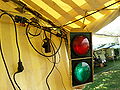
Because of a faulty switch the network at haxogreen 2012 was quite buggy for a while. After a couple of hours we were sick of opening up a terminal and starting a ping to check if the internet was up. We had a raspi and a traffic light available, so we started hacking. We made a little relay board to let the raspi control the traffic light, and wrote a shell script to check if there was an internet connection and set the traffic light to green if there was, to red if there wasn't.
http://www.youtube.com/watch?v=uxdJv-h0Fks
People who helpt
- User:Pietdv
- gmc
- Zarya
Gallery
-
-
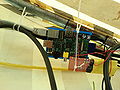 Raspberry PI with a relay board connected to it


Script
#!/bin/sh

IP="8.8.8.8"
TIMEOUT="2"
GPIO_GREEN="23"
GPIO_RED="24"

# no user-servicable parts below

echo ${GPIO_GREEN} > /sys/class/gpio/export
echo "out" > /sys/class/gpio/gpio${GPIO_GREEN}/direction
echo ${GPIO_RED} > /sys/class/gpio/export
echo "out" > /sys/class/gpio/gpio${GPIO_RED}/direction

while [ 1 ]; do
  ping -c 1 -W 2 -qq ${IP} > /dev/null 2>&1

  ec=$?

  if [ ${ec} -eq 0 ]; then
    echo "1" > /sys/class/gpio/gpio${GPIO_GREEN}/value
    sleep 3
    echo "0" > /sys/class/gpio/gpio${GPIO_RED}/value
  else
    echo "0" > /sys/class/gpio/gpio${GPIO_GREEN}/value
    echo "1" > /sys/class/gpio/gpio${GPIO_RED}/value
  fi
done